Free download
Rental property mileage log
A free mileage log built for rental properties: one row per trip with the fields the IRS asks to see, the 2026 rate applied by trip date (the rate changed mid-year), and per-property totals ready for Schedule E line 6. No email, no signup.
- Every trip: date, property or destination, business purpose, round-trip miles
- 2026 split-year rates applied by date: 72.5 cents Jan to Jun, 76 cents Jul to Dec
- Year total plus per-property subtotals, mapped to Schedule E line 6
Educational template, not tax advice. The rates are the IRS 2026 standard mileage rates for business use; confirm the treatment for your situation with your CPA.
The deduction most landlords never claim
Rental trips are small and constant: a hardware store run, a showing, a walk-through with a contractor. None of them feels worth writing down, so at tax time line 6 files at zero. The arithmetic says otherwise. A single 12-mile hardware-store round trip a week is roughly 624 miles a year, worth about $460 at the 2026 rates. Add showings, inspections, and meter reads across two properties and the deduction quietly clears $1,000. The reason it goes unclaimed is never the math, it is the missing log, because the IRS does not accept a number without one.
What the IRS requires on every entry
| Field | Why it matters |
|---|---|
| Date of the trip | Places the trip in the right tax year, and in 2026 it also decides which rate applies |
| Property or destination | Ties the trip to a rental activity, and feeds the per-property split Schedule E needs |
| Business purpose | "Meet plumber, kitchen leak" survives an audit; "errands" does not |
| Round-trip miles | The number the rate multiplies; odometer or a maps app, either works if logged at the time |
| Year odometer readings | Jan 1 and Dec 31 readings prove total miles, the denominator an auditor checks business miles against |
The log has to be contemporaneous, kept at or near the time of the trip. A spreadsheet rebuilt in April from memory is the classic way this deduction dies under review. Details are in IRS Publication 463, which governs travel recordkeeping.
The 2026 rate changed mid-year
The IRS set the 2026 business rate at 72.5 cents per mile in January, then raised it to 76 cents for trips from July 1 through December 31, a mid-year adjustment it has made only a handful of times (2022 was the last). So a 2026 log needs two rates, keyed to each trip's date: a February trip earns 72.5 cents a mile, an August trip 76. The template does that with a date check per row, and the current rates are always at irs.gov/tax-professionals/standard-mileage-rates. The three seeded example rows show the split working: 55 miles across February, May, and August compute to $40.75, with the August trip earning the higher rate.
Which trips count
| Deductible on line 6 | Not deductible here |
|---|---|
| Driving to the property to inspect, fix, or maintain | Your regular commute to a W-2 job |
| Showings, tenant meetings, move-in and move-out walk-throughs | A personal errand with a rental stop bolted on (log only the business detour miles) |
| Hardware store, supply runs, hauling appliances | Trips during a capital project (a remodel, a roof): that travel goes into the project's cost basis and depreciates with it |
| The bank for the rental account, the CPA for the rental return | Miles you cannot tie to a purpose, because they were never logged |
How to keep it without hating it
The log fails as a year-end project and works as a small habit. Note the trip when it happens, a one-line entry in your phone is enough, and move entries into the spreadsheet weekly. Photograph the odometer every January 1, that single photo backs the year-total field. Name properties consistently in the destination column ("Oak St duplex", not three spellings of it), because the per-property block matches on that text. And log the miles even when you are unsure a trip qualifies; deciding at tax time is easy when the record exists and impossible when it does not.
The tax side: Schedule E line 6
Auto and travel is line 6 of Schedule E, and Schedule E reports each property in its own column, so the year total has to land allocated, not as one lump. The template's per-property block subtotals every trip whose destination mentions the property you name. Portfolio-wide trips, the bank run, the CPA visit, can be split evenly or by unit count; either is fine, pick one and stay consistent. If you want to see every line the way the form does, the Schedule E worksheet lays out the whole form, and the rental property spreadsheet is the income-and-expense ledger this log rides alongside. The standard rate covers gas, insurance, repairs, and vehicle depreciation in one number; deducting actual vehicle costs instead is legitimate but demands receipts and a business-use percentage, and that percentage still comes from a mileage log. One timing rule worth knowing: to keep the choice open, use the standard rate the first year a car serves the rentals, after which you can switch methods year to year.
Frequently asked questions
What is the IRS mileage rate for rental property in 2026?
There are two. Trips from January 1 through June 30, 2026 earn 72.5 cents per mile, and trips from July 1 through December 31 earn 76 cents, a mid-year adjustment the IRS has made only a handful of times. A log that applies one rate to the whole year is wrong in both directions, so this template keys the rate to each trip's date. For rentals the deduction lands on Schedule E line 6, auto and travel.
Can a landlord deduct mileage for driving to a rental property?
Yes. Trips whose purpose is the rental activity are deductible: inspecting or fixing the property, meeting a tenant or contractor, hardware store runs, the bank for the rental account, the CPA for the rental return. What the IRS wants is proof of purpose, which is exactly what the log records. One exception matters: travel that is part of a capital project, like driving back and forth during a remodel, belongs in that project's cost basis and is recovered through depreciation, not deducted on line 6.
Should I use the standard mileage rate or actual vehicle expenses?
The standard rate is one number that already covers gas, insurance, repairs, and vehicle depreciation, priced per business mile. Actual expenses deduct the business-use share of every real cost, which can win for an expensive vehicle used heavily for the rentals, but it demands receipts for everything and a business-use percentage that still comes from a mileage log. For a personal car and a few properties the standard rate is usually simpler and lands close. To keep the choice open, use the standard rate the first year the car serves the rentals; you can switch in later years.
What records does the IRS require for the mileage deduction?
A contemporaneous log: date, destination, business purpose, and miles for every trip, written at or near the time of the trip, plus support for the year's total miles, which is why the template carries odometer fields for January 1 and December 31. Reconstructing a year of trips at filing time is the classic way this deduction dies in an audit. A log maintained weekly, with a purpose on every line, holds up.
How do I split mileage between properties on Schedule E?
Schedule E reports each property in its own column, so line 6 needs the deduction allocated, not one lump sum. Name each property in the template's per-property block and it subtotals every trip whose destination mentions that property. Portfolio-wide trips, like the bank run or the CPA visit, can be split evenly or by unit count; either method is fine, pick one and stay consistent year to year.
Does this mileage log work in Google Sheets?
Yes. It is a standard XLSX using IF, DATE, SUM, and SUMIFS, which Excel, Numbers, and Google Sheets all support natively. Upload it to Google Drive and open as a Sheet; the date-keyed rate, the deduction column, and the per-property subtotals keep computing. The three seeded example rows are plain values, type over them and the totals follow.
How line 6 stays filled in Oberlin24
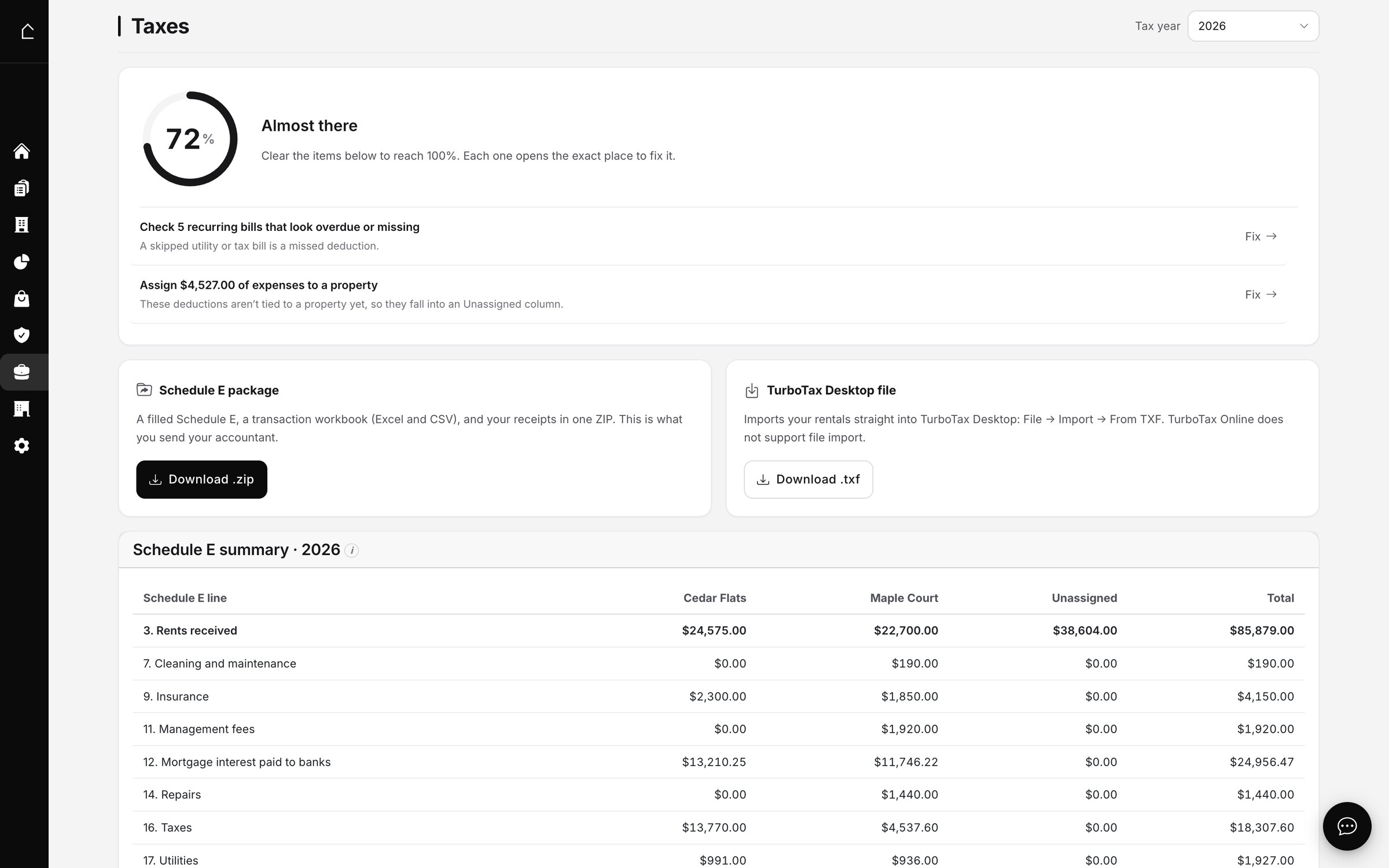
I run two rentals of my own. By hand, this deduction is the log above plus the discipline to keep it. In Oberlin24 the missed-deduction scan reads each year's Schedule E as it builds and flags exactly this: a landlord managing properties with nothing on Auto and travel gets a 'No vehicle mileage or travel logged' finding before filing, next to the other lines that look underfed. The log is still yours to keep, but the year can no longer file at a silent $0 on line 6. Here is the taxes view where those flags land:
Prefer to build your own? The shape is simple: a dated log with purpose and miles, a rate keyed to the trip date, and a per-property split at year end. It is 2026, you can wire that together yourself.
This is one piece of the monthly routine. I wrote up the whole thing, the four monthly moves and the year-end return, in how I do the bookkeeping for both rentals in about a minute a month.