Free download
Rental property spreadsheet
A free rental property spreadsheet for Excel or Google Sheets: one transaction log with a Schedule E category dropdown, a monthly cash summary that fills itself, and a tax rollup that keeps capital improvements, security deposits, and personal spending out of your deductions. No email, no signup.
- One row per transaction: date, property, category dropdown, money in, money out
- Monthly income, expenses, and net, computed live for any year you pick
- A Schedule E rollup, line by line, with the non-deductibles fenced off
Educational template, not tax advice. It mirrors the Schedule E line structure; your CPA has the final word on your return.
What is inside
| Sheet | What it does |
|---|---|
| Transactions | The log. One row per payment in or out, with dropdowns for property and category. This is the only sheet you type on day to day |
| Monthly | Money in, money out, and net for each month of the year you enter. Every cell is a live formula against the log |
| Schedule E | Your categories totaled onto Schedule E lines 3 through 21, expense refunds netted, with a separate section for the money that does NOT belong on the form |
| Lists | The category list and your property names. Edit the properties; leave the categories, the formulas match on their exact text |
How to use it
Once a week, or once a month if your volume is low, open your bank feed and enter each rental transaction as one row: the date, which property, who was paid or who paid you, a category from the dropdown, and the amount in the money-in or money-out column. That is the whole job. The monthly summary and the Schedule E rollup recompute on every row you add, so tax prep in January is reading a sheet that already exists instead of reconstructing a year from statements.
Use one file per year. When January comes, save a copy, clear the log, and update the year cell on the Monthly sheet. The old file is your permanent record for that tax year, and the running-total structure means it still ties out if a question comes up two years later.
The three mistakes the spreadsheet is built to catch
Most rental spreadsheets are a flat list of expenses, which quietly invites the three most expensive categorization errors landlords make. This one fences them off with their own categories, totaled OUTSIDE the deductible columns:
| The money | Where it actually goes |
|---|---|
| A new roof, HVAC, remodel | Not an expense this year. A capital improvement starts its own 27.5-year depreciation schedule, and only that year's slice lands on line 18. Deducting it in full is the classic audit flag |
| A security deposit received | Not income. It is a liability you owe back, and it sits off the Schedule E entirely until the tenancy ends. Only the part you keep at move-out becomes line 3 income, in that year |
| Groceries on the same card | Not deductible, and mixing it into the expense list is how a clean audit trail dies. The Personal category keeps it visible but out of every total |
The categories themselves follow the fifteen Schedule E expense lines, so there is no translation step at filing time. If you are unsure where a specific cost belongs, the line-by-line categorization guide walks every common rental expense to its line, and repairs versus improvements, the hardest call on the list, has its own guide.
Income, and what counts as it
The income side of a rental spreadsheet is shorter but has its own trap. Rent received and late fees are line 3 income in the year they land, including a prepaid last month collected up front. A security deposit is not income when it arrives, and a deposit you later keep for damage is income then, not when you received it. The log handles all three cases with two categories: rent and other rental income roll into line 3, and deposits stay in their own fenced-off row until you decide what happens to them. For the per-tenancy payment history a court or lender asks for, pair the log with the rent ledger template, and when a tenancy starts or ends mid-month, the prorated rent calculator gives the partial-month figure to log.
Cash flow is not taxable income
The Monthly sheet nets money in against money out, which is your cash flow. The Schedule E sheet computes something different: taxable income, where a capital improvement you paid cash for is not an expense, and depreciation you never wrote a check for is. The two numbers disagree all the time, and both are right. For the analysis side, what the property returns on your money and what depreciation is actually worth, the ROI calculator and the depreciation calculator pick up where the log leaves off, and the line 18 number the rollup asks for comes straight out of the depreciation schedule template.
When a spreadsheet stops being enough
A spreadsheet like this genuinely works for one or two properties and a landlord who enters rows on schedule. The failure mode is not the math, it is the entering: the habit slips for a quarter, the bank feed and the log drift apart, and January becomes archaeology. The fix at that point is not a better spreadsheet, it is books that reconcile themselves against the bank. The rental bookkeeping walkthrough covers the full system either way, spreadsheet or software, and lays out the workload numbers to judge which side of the line you are on.
Frequently asked questions
Is there a free rental property spreadsheet for Excel or Google Sheets?
Yes, this one, with no email wall. It is a standard XLSX with three working sheets: a transaction log you type on, a monthly cash summary, and a Schedule E rollup, both computed live from the log. It opens directly in Excel and Numbers and converts cleanly to a Google Sheet with the formulas intact.
What should a rental property spreadsheet include?
A dated transaction log, not just category totals. Each row needs the date, the property, who was paid or who paid you, a category that maps to a Schedule E line, and the amount as money in or money out. From that one log you can derive everything else: monthly cash flow, per-category totals, and the numbers that go on your return. A spreadsheet that starts with totals instead of transactions cannot be audited or corrected later.
How do landlords track rental income and expenses in a spreadsheet?
Enter every rental transaction as one row, weekly or monthly, straight from the bank feed. Keep the categories aligned to the fifteen Schedule E expense lines so filing is a copy job, keep one file per tax year, and keep non-deductible money (improvements, deposits, personal spend) in categories that stay out of the expense totals. The discipline that matters is the entering; the math is just formulas.
What expense categories should a rental spreadsheet use?
The Schedule E lines themselves: advertising, auto and travel, cleaning and maintenance, commissions, insurance, legal and professional fees, management fees, mortgage interest, other interest, repairs, supplies, taxes, utilities, and other. Inventing your own categories means re-translating every one of them at tax time. This template's dropdown is exactly that list, plus fenced-off categories for capital improvements, security deposits, and personal spending.
Why is a capital improvement not an expense in the spreadsheet?
Because the IRS does not treat it as one. A new roof or HVAC is depreciated over 27.5 years, not deducted the year you pay for it; only that year's depreciation slice lands on Schedule E line 18. The template totals improvements in their own section, outside the expense rollup, so the full cost never accidentally lands on your return as a repair.
When should I move from a spreadsheet to accounting software?
When the entering stops happening. The math in a spreadsheet scales fine; the manual data entry does not. Warning signs: more than two or three properties, a co-owner or spouse also spending on the rental account, or a backlog of more than a month you keep meaning to enter. At that point books that pull from the bank feed and reconcile themselves cost less than the errors the stale spreadsheet is already making.
How I do this in Oberlin24
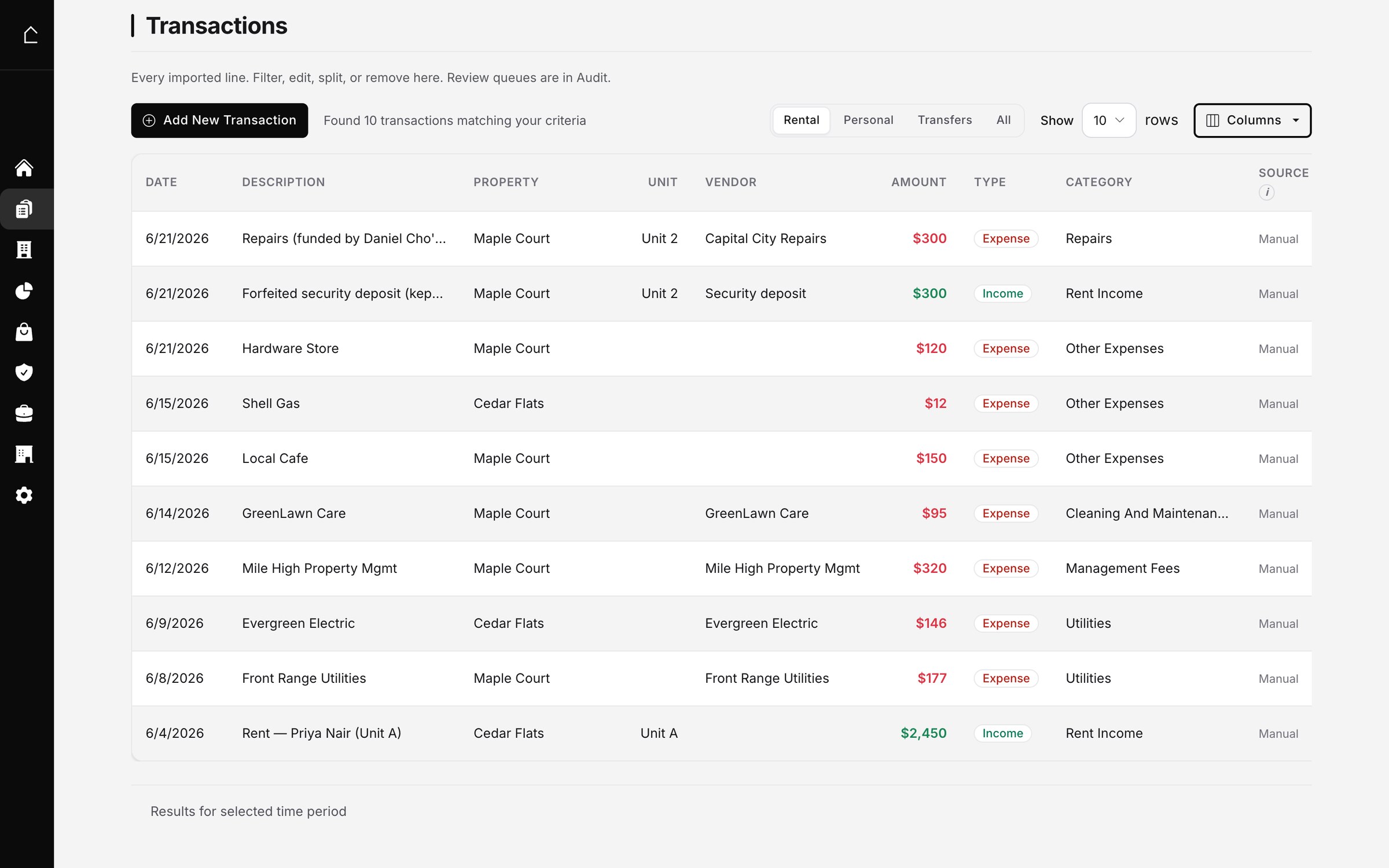
I run two rentals of my own and kept exactly this spreadsheet for years. The log worked until the entering slipped, always in the busy months when the numbers mattered most. In Oberlin24 the bank feed IS the log: every transaction lands already dated and amounted, the bot categorizes it to its Schedule E line, and the ones it is not sure about wait in a review queue instead of being silently wrong. The monthly and tax rollups are the same idea as the sheets here, they just never go stale. Here is the ledger view:
Prefer to keep it manual? This template is the full structure: a dated log, category dropdowns that match the tax form, and rollups that are formulas instead of promises. It is 2026, you can absolutely run a small portfolio on it.
This is one piece of the monthly routine. I wrote up the whole thing, the four monthly moves and the year-end return, in how I do the bookkeeping for both rentals in about a minute a month.